
GPS NTP Server
Accurate time is one of those things most people do not think about until something breaks.
In a basic home network, that usually does not matter much. A router, laptop, phone, smart TV or streaming box quietly gets time from the internet. Most people never see that happen.
But once a home network starts looking more like infrastructure, time becomes part of the foundation.
That is where my network is now.
I run a segmented home network with multiple VLANs, home lab systems, IoT devices, self-hosted services, network clocks, streaming devices and security tooling. Many of those systems create logs. When I am troubleshooting, I need those logs to line up.
That is why I added a CenterClick NTP270 GPS NTP Server to my network.
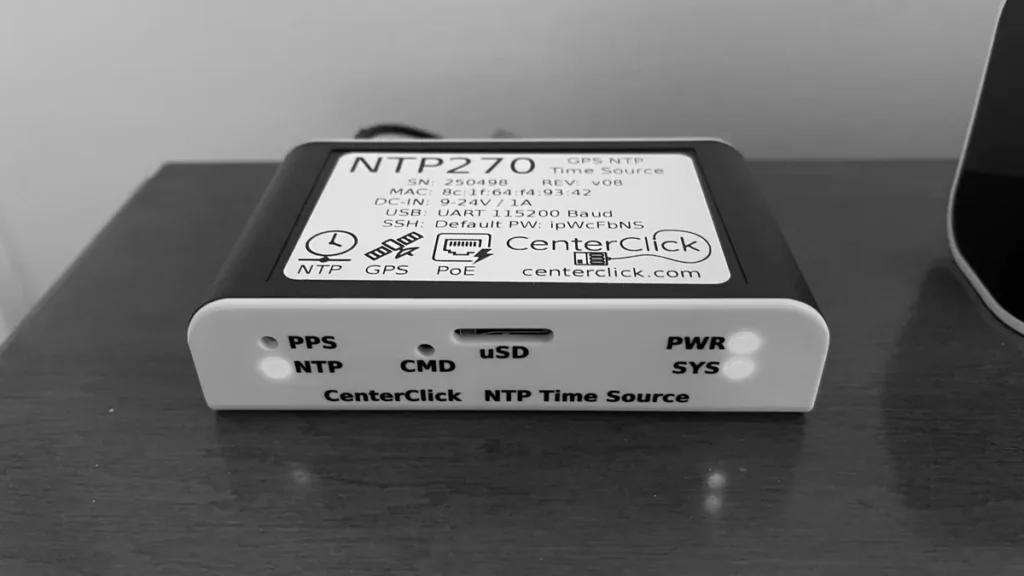
In my home, it is reachable internally as: ntp.greyscale.zone
That hostname is intentional. I want infrastructure to have names that describe what the system does. I do not want to depend on a random IP address that I will forget six months later.
The NTP270 is not a flashy home lab toy. It is a local time appliance. It does one important job: it provides time to the rest of the network.
What is NTP?
NTP stands for Network Time Protocol. It is the protocol computers and network devices use to synchronise their clocks.
The official NTPv4 specification describes NTP as a protocol used to synchronise computer clocks across the internet.
Sources:
https://www.rfc-editor.org/info/rfc5905/
https://datatracker.ietf.org/doc/html/rfc5905
In plain English, NTP helps devices agree on what time it is.
That sounds simple, but time affects almost everything in a network:
- System logs
- Firewall logs
- Security events
- Certificates
- Authentication
- Backups
- Scheduled jobs
- File timestamps
- Monitoring alerts
- Recordings
- IoT behaviour
- Troubleshooting
When time is wrong, systems become harder to trust.
A log entry may still exist, but the sequence of events becomes unclear. Did the firewall block happen before or after the server error? Did the authentication failure happen before or after the reverse proxy event? Did the IoT device report before or after the DNS query?
If clocks are off, the answer may not be obvious.
Why time matters in my home lab
For me, the biggest benefit is log correlation.
That is the practical reason this device matters.
I may need to compare logs from several places:
- Router logs
- Firewall logs
- DNS logs
- Docker host logs
- Reverse proxy logs
- WordPress logs
- Nextcloud logs
- Security plugin logs
- IoT device activity
- Streaming device behaviour
- System update logs
- Backup logs
If those systems do not agree on time, troubleshooting becomes guesswork.
In a small network, a few minutes of clock drift may be annoying. In a segmented network with multiple systems, it can waste real time.
A local NTP server gives everything a consistent reference point.
It does not make every system perfect. It does not solve every logging problem. But it removes one of the most basic sources of confusion: devices disagreeing about the current time.
Why I wanted local time instead of internet time
Most home networks rely on public internet time servers.
That is fine for most people.
But I wanted a local time source for several reasons:
- I run multiple VLANs.
- I have IoT devices that should not freely reach the internet.
- I want cleaner log correlation.
- I want core infrastructure to keep working as locally as practical.
- I want fewer devices making unnecessary outbound NTP connections.
- I want a predictable time source that I control.
- I want a documented time service for the network.
The CenterClick NTP270 gets time from GPS/GNSS satellite systems and provides that time to the local network using NTP. CenterClick describes the NTP220/NTP270 series as GPS/GNSS-based appliances that generate a local Stratum 1 NTP time source.
Sources:
https://centerclick.com/
https://centerclick.com/ntp/docs/
For my network, the point is not bragging about Stratum 1 time.
The point is that time is local, intentional and controlled.
How I use it across VLANs
The important part of my setup is not just that I have an NTP server.
The important part is how it is used.
The NTP270 is reachable internally as: ntp.greyscale.zone
My router redirects NTP traffic from all VLANs to this device.
That means devices across the network use the local NTP270 for time instead of each device independently reaching out to whatever public time server it wants.
This is especially useful because many consumer and IoT devices do not give you much control. Some let you configure a time server. Some do not. Some try to use vendor-defined or hard-coded time sources.
Router-level NTP redirection gives me a cleaner design.
The model is:
- Keep VLANs segmented.
- Provide NTP as a controlled infrastructure service.
- Redirect NTP traffic to the local NTP270.
- Reduce unnecessary outbound NTP traffic.
- Improve consistency across logs and devices.
This matters because VLANs should not mean every device is isolated from basic infrastructure. VLANs should mean devices get only the services they need.
Time is one of those services.
A clock does not need access to my servers. An IoT device does not need access to management interfaces. A streaming device does not need broad access across the home lab.
But all of them may need accurate time.
So the NTP270 becomes one of the shared infrastructure services that makes segmentation practical.
Why redirecting NTP traffic helps
In a perfect world, every device would let me configure: ntp.greyscale.zone
Real networks are not perfect.
Some devices are cooperative. Others are not. Some consumer devices try to reach public NTP servers directly. Others bury time settings or provide no useful configuration at all.
By redirecting NTP traffic at the router, I do not have to trust every device to behave perfectly.
This gives me several practical benefits:
- Devices receive local time even if they try to use outside NTP.
- IoT devices do not need general outbound NTP access.
- Time becomes consistent across VLANs.
- Logs become easier to compare.
- The network has a clear authoritative local time source.
- Troubleshooting becomes cleaner.
This is the part people can actually use in their own networks.
Buying an NTP appliance is one decision. Designing how devices use it is the more important decision.
What Stratum 1 means
In NTP terminology, “stratum” describes how far a time server is from an authoritative reference clock.
A GPS receiver is treated as a direct time reference. A server directly connected to that reference can operate as a Stratum 1 NTP server.
That does not mean every home network needs one.
For me, the practical benefit is simpler:
- The time source is local.
- The time source is dedicated.
- The time source does not depend on another internet NTP server.
- Devices inside the network have a consistent place to get time.
That is the value.
Why I chose an appliance instead of building one
You can build a GPS NTP server yourself.
A Raspberry Pi, GPS module, antenna and the right software can do the job. For some people, that would be a fun and worthwhile project.
I chose the CenterClick NTP270 because I wanted an appliance.
The appeal is simple:
- It is purpose-built.
- It does not require a cloud account.
- It does not require a subscription.
- It can be managed locally.
- It can operate as local infrastructure.
- It sits on the network and does one job.
- It reduces the number of homemade devices I need to maintain.
In a home lab, there is always another thing you can build.
But not everything should become another maintenance project.
Sometimes the better decision is to buy a small appliance that does one job cleanly and reliably.
Local management
One thing I like about the NTP270 is that it can be managed locally.
CenterClick documentation says configuration is performed through the admin console, which can be accessed using the local USB console or remotely through Secure Shell.
Source:
https://centerclick.com/ntp/docs/admin_cli
That fits the way I prefer to run core home infrastructure.
I do not want a cloud dashboard for a local time server. I do not want a subscription. I do not want a device that stops being manageable if a vendor service changes.
For this kind of role, local management is a feature.
Enabling HTTPS on the NTP270
One setup issue I wanted to resolve was HTTPS for the management interface.
The device initially had HTTP enabled and HTTPS disabled.
For a local appliance, some people might leave it that way. I did not want to. Management interfaces should be treated carefully, even at home.
The NTP270 supports multiple ways to enable HTTPS, including ACME HTTP-01, ACME DNS-01 and manual certificate upload.
Source:
https://centerclick.com/ntp/docs/https
In my setup, I used the manual certificate method.
The process required an off-box generated certificate chain and private key. The files expected by the device were:
- fullchain.pem
- privkey.pem
After uploading those files to the appliance, I used the services menu to enable HTTPS. The device found the uploaded certificate files, installed them and enabled HTTPS.
The final result was:
HTTPS: enabled (manual)
That was the outcome I wanted.
The NTP270 is still a local appliance, but the management interface is no longer HTTP-only.
Why HTTPS matters on a local appliance
HTTPS does not magically make a device secure.
But plain HTTP management is not ideal, even inside a home network.
If a device supports encrypted management, I prefer to use it. That is especially true for infrastructure devices.
The NTP270 is not just another consumer gadget. It is a time source for the network. It supports logging, troubleshooting, scheduled tasks, clocks and local services. That makes it part of the infrastructure.
So I treated it like infrastructure.
I gave it a clear hostname. I enabled local management. I enabled HTTPS. I placed it into the network design intentionally. I redirected NTP traffic to it from the VLANs.
That is the difference between plugging in a device and actually integrating it.
The smart clocks are just one example
The WiFi matrix clocks in my home are one example of why local NTP is useful.
They need time. They do not need broad access to the rest of the network.
So they are treated like IoT devices. They are kept away from trusted systems, and their time traffic is directed to the local NTP server.
That lets the clocks do their job without giving them unnecessary network access.
This is a small example, but it shows the larger design principle:
Give devices the services they need, not the whole network.
The Tablo is another example
My Tablo over-the-air TV setup is another example.
The coaxial cabling in my home was installed in the analogue TV days. In my setup, that old coax path created enough signal loss that NBC did not pass through reliably.
The better answer was to place the Tablo on the top floor where the antenna signal was stronger. From there, the Tablo serves TV to systems in the home over the network.
That solved the signal placement problem.
But a DVR still needs correct time. Recordings, guide behaviour and scheduling depend on the device knowing the current date and time.
That is why the local NTP server matters here, too.
The Tablo is not the reason I bought the NTP270. It is one of the devices that benefits from having reliable local time.
What this does not fix
A GPS NTP server does not solve every network problem.
It will not fix bad firmware. It will not make every consumer device fully configurable. It will not eliminate all cloud dependencies. It will not make IoT devices trustworthy.
It also does not mean every device will behave exactly the way I want.
That is why the network design matters.
The NTP270 provides the local time source. The router redirects NTP traffic. The VLANs provide segmentation. Firewall rules control access.
The appliance is one part of a larger design.
Who should consider something like this?
A GPS NTP server is probably unnecessary for a normal home network.
If your network is just a router, a few phones, a laptop and a smart TV, public internet time is probably fine.
But a local NTP server starts to make sense if you run:
- A home lab
- Multiple VLANs
- Local DNS
- Firewalls
- Security logging
- Network cameras
- IoT devices
- Smart clocks
- Local servers
- Reverse proxies
- Self-hosted services
- Offline or semi-offline systems
- Over-the-air TV equipment
- Devices with restricted internet access
The more infrastructure you run, the more time matters.
What I want people to take away
The point of this project is not that everyone should buy the same NTP appliance.
The point is that time should be treated as infrastructure.
If you run a segmented network, ask a few questions:
- Where do your devices get time?
- Do your VLANs allow uncontrolled outbound NTP?
- Do your logs line up across systems?
- Can restricted devices still get a valid time signal?
- Are IoT devices reaching outside when they do not need to?
- Do your local services keep working when the internet is limited?
- Is time documented as part of the network design?
Those questions matter more than the specific product.
For me, the CenterClick NTP270 answered a real need. It gives my network a local time source. My router redirects NTP traffic from all VLANs to it. Logs are easier to correlate. Devices that need time have a local source. Core infrastructure is cleaner.
It is not flashy.
It is useful.
Products shown or mentioned
CenterClick NTP270 GPS NTP Server
https://amzn.to/4vyW37v
10-inch WiFi NTP digital clock
https://amzn.to/4anVXrf
WiFi matrix clock with seconds display
https://amzn.to/4v3ut2D
Tablo TV 4th Gen 4-Tuner OTA DVR
https://amzn.to/4uXkUlB
Final thoughts
The CenterClick NTP270 is one of those devices that makes more sense when your home network becomes more than a home network.
If all you need is internet access and streaming, you probably do not need it.
But if you are running VLANs, logs, local services, IoT devices, clocks, over-the-air TV and self-hosted infrastructure, time starts to matter.
For me, the biggest value is log correlation.
When something happens, I want to know when it happened.
That sounds obvious, but it only works when the network agrees on time.
Video: https://youtu.be/4G1OGzjeCYo